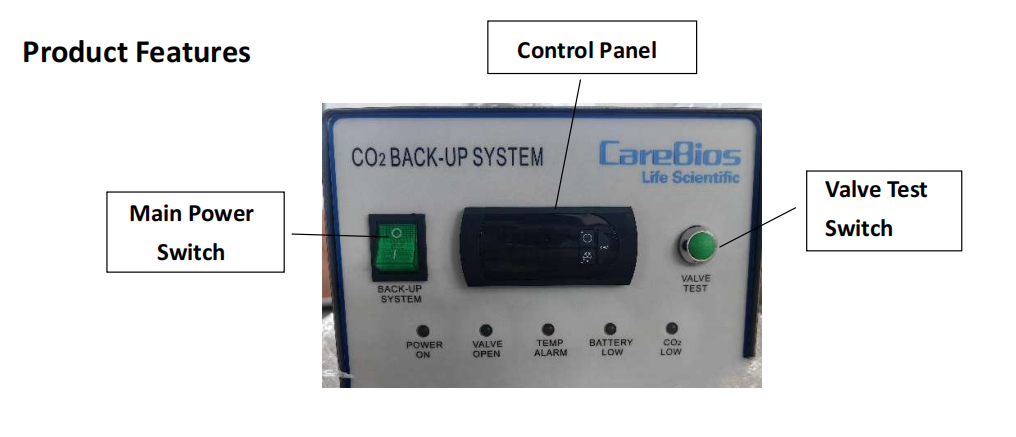
1. Main power switch The main power switch must be turned on for the system to operate properly. During a power outage, the battery can then supply the power to run the backup system.
2. Temperature display and indicator light The display screen shows the actual temperature in the storage cabinet; When the snow flake light is lit on the display, the feed solenoid valve is activated and the injection is in process. When the light is on the display, the man power switch is in off mode. ERR on the display indicates a sensor failure.
3. Valve test key The test key is to allow a temporary activation of the solenoid valve. This is to ensure the flow of cryogen is available to the freezer when called by the controller.
4. Indicator light for ‘TEMP Alarm’ When the temperature is lower than -70°C it will trigger this alarm.
5. Indicator light for ‘Battery Low’ When the indicator is turned on, the battery power is low and it needs to be charged. Connect the AC power to a power outlet to charge the system.
6. Indicator light for ‘Low Carbon Dioxide’ When the indicator is turned on, the pressure in the carbon dioxide tank is lower than 35 bar. The tank must be replaced to ensure a proper cooling is available from the backup system.